
BlackBerry Passport 2025 — Full Review, Features, OS Support & Should You Use It Today?
Quick Verdict
The BlackBerry Passport remains an iconic typing machine thanks to its 4.5″ square display and legendary physical keyboard. In 2025, it works best as a secondary device or collector’s item rather than a primary smartphone. BB10 is end-of-life, app support is broken, and many modern services don’t authenticate reliably. Fantastic for typing and distraction-free productivity — impractical for daily modern smartphone use.
What Changed Since 2014 — And Why It Matters
The Good
- Hardware has aged beautifully.
- Build quality still feels premium.
- Display and keyboard remain unique for document work and long-form typing.
The Bad
- BlackBerry 10 (BB10) is discontinued and receives no updates.
- App ecosystem has collapsed; many apps and services no longer work.
- Modern authentication and payment services often fail on the platform.
This contrast defines whether the Passport makes sense for you today.
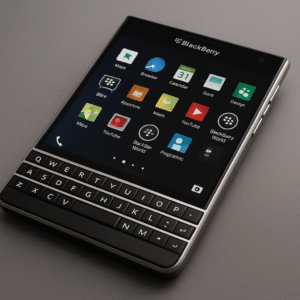
BlackBerry Passport 2025 Design & Build
The Passport still stands out in 2025.
- Stainless-steel frame and premium in-hand feel.
- 4.5″ square display designed for documents and side-by-side layouts.
- Comfortable two-hand typing — not one-hand friendly. Almost no modern device matches its ergonomic identity.
Display Quality
- 1440×1440 IPS square panel that excels at reading PDFs, long emails, and technical documents.
- Ideal for offline productivity and long-form text.
Downsides: modern apps assume rectangular screens, many UIs feel cramped, and video playback is awkward.
Keyboard Experience
The Passport keyboard remains exceptional for long typing sessions.
- Physical 3-row QWERTY with touch-sensitive gestures.
- Precise for long-form typing and note-taking.
If typing is your priority over apps, the Passport still delivers joy.
Specs Snapshot
| Item | Specification |
|---|---|
| SoC | Snapdragon 801 (MSM8974-AA variant) |
| RAM | 3 GB |
| Storage | 32 GB + microSD |
| Display | 4.5″ 1440×1440 IPS LCD |
| Battery | 3450 mAh |
| OS | BlackBerry 10.3 (end-of-life) |
Good for light work; outdated for heavy browsing or modern apps.
Performance in 2025
Good for:
Email, notes, reading, offline writing, and light productivity.
Not good for:
Modern apps, social media, browser-heavy tasks, and multitasking.
Expect occasional slowdowns and rendering issues on modern websites.
Battery Life & Replacement Realities
Most Passport units now suffer battery degradation. If you replace the battery:
- Buy from reputable sellers — avoid unbranded cells (risk of swelling).
- Use a skilled technician — the internal layout is delicate.
- Calibrate the new battery with a full charge–drain cycle.
A quality aftermarket battery can restore a full day of light use.
Operating System (BB10) in 2025 — The Biggest Limitation
BB10 is officially end-of-life (Source: BlackBerry official announcement):
- No security patches or vulnerability fixes.
- BlackBerry World is defunct; many services fail on login/authentication.
Security Reality: BB10 was secure when updated, but without patches it no longer meets modern standards.
Safe for: offline tasks, local notes, reading, and local file use.
Not safe for: banking, UPI, password managers, sensitive cloud apps, and many modern web logins.
Android Apps on the BlackBerry Passport
The Android runtime on Passport devices is equivalent to Android 4.3 — extremely old. The runtime is no longer updated, so many modern apps will crash or refuse to install. Even if an APK installs, performance is slow and security patches are outdated, making the setup unreliable for daily Android use.
You can sideload older APKs or use third-party stores, but most old APKs:
- Are abandoned or unstable,
- Depend on newer Google Play Services/APIs that BB10 cannot provide, and
- Often lack essential features or fail to authenticate.
Recommendation: Install only trusted, simple utilities; avoid apps that handle payments or personal data.
Risks of APK Sideloading (Important)
- Higher chance of malware-infected apps.
- Outdated security libraries and no Play Protect sandbox.
- Some apps can break the Android runtime, increasing vulnerability risk.
Modding & Workarounds in 2025
Enthusiasts keep the Passport alive via:
- Older patched APKs and community patches,
- Partial Play Store hacks and custom launchers,
- Retrofit kits that replace internal logic boards with modern Android hardware.
Reality Check: Retrofit kits are extremely limited, expensive, complex to install, and not 100% reliable. These options are for hardcore enthusiasts only. For a practical modern keyboard phone, consider Unihertz Titan models instead.
Camera & Media
The 13MP OIS camera was decent in 2014 but now shows its age:
Weak low-light performance, poor dynamic range, and basic video. Good for document scanning and casual snaps, not for content creation.
Who Should Buy the BlackBerry Passport in 2025?
Buy if you are:
- A BlackBerry fan or collector,
- A typing enthusiast,
- Someone who wants a distraction-free device for offline writing.
Avoid if you need:
- WhatsApp or modern messaging,
- Banking/UPI, social media, or modern apps,
- A secure daily phone for sensitive work.
Buying Checklist (2025)
Check these before purchase:
- Battery condition (no swelling).
- All keyboard keys register.
- Display uniformity (no dead pixels).
- OS version (10.3.x preferred).
- Seller reputation and return policy.
Realistic expectations are crucial.
Conclusion — Brutally Honest Take
The BlackBerry Passport is a legendary productivity device from a pre-algorithm era. In 2025, it offers a refreshing philosophy: distraction-free typing and premium hardware. But the world has moved on. For collectors, writers, and enthusiasts it still offers joy. For most people, a modern Android or iPhone is a far better everyday choice.
FAQ — Updated for Accuracy
1. Is the BlackBerry Passport usable in 2025?
Yes — but mainly as a secondary or offline device.
2. Can you install Android apps?
Only older APKs. Many modern apps fail due to missing libraries and incompatible services.
3. Is WhatsApp supported?
No. Official support ended years ago.
4. Is BB10 secure in 2025?
No — without active updates it does not meet modern security standards.
5. Is battery replacement worth it?
Yes, if done through reputable sellers and if you plan to use the phone as a backup or offline device.